


In an age where data protection legislation is stricter than ever, paper shredders have quietly become an important piece of equipment within the workplace.
Whether you’re a sole trader working from home or managing a busy corporate office, what you do with your waste documents matters both from a legal and practical standpoint. Yet most people give little thought to the shredder sitting in the corner, treating it as an afterthought rather than the data security tool it truly is.
This guide will walk you through everything you need to know: the different types of shredders, what the security levels actually mean, how to match a machine to your needs, and the mistakes most buyers make.
Why Shredding Documents Still Matters
It might seem like a cause for concern in a digital world, but paper documents remain one of the most common sources of data breaches.
Offices generate mountains of sensitive paper in the form of bank statements, payslips, invoices, client correspondence, HR records. Much of it ends up in general recycling bins without a second thought.
Under the UK’s data protection framework, businesses have a legal obligation to dispose of personal data securely, whether it’s held digitally or on paper. A GDPR breach from carelessly discarded documents can carry significant fines, not to mention reputational damage.
For many small businesses, the risk simply isn’t worth it and a decent document shredder is a low-cost solution to a potentially expensive problem.
Beyond compliance, there’s the very practical matter of identity fraud. Criminals have been known to sift through commercial and domestic waste to harvest personal information. Shredding documents before disposal is one of the most effective deterrents available.
Understanding Shredder Security Levels
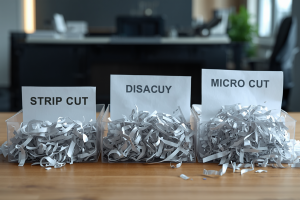
Not all shredders are equal. The DIN 66399 standard defines seven security levels, commonly referred to as P-1 through P-7. Understanding these levels is the single most important factor in choosing the right machine.
- P-1 and P-2 produce wide strips and are only suitable for general, non-sensitive waste like junk mail or internal memos with no confidential content. These machines are fast and cheap but offer minimal real protection.
- P-3 is the entry point for most office use. It produces narrower strips and is suitable for standard business documents that you wouldn’t want a competitor or stranger to read easily, but which don’t contain highly sensitive personal data.
- P-4 cuts documents both vertically and horizontally, producing small rectangular particles. This is the minimum recommended level for documents containing personal data under most data protection guidance.
- P-5 offers a finer micro-cut and is suitable for confidential business data, HR records, financial information, and anything subject to regulatory oversight.
- P-6 and P-7 are specialist, high-security machines used in government, military, and intelligence contexts. For many offices, these are overkill, though they’re worth knowing about.
For most UK businesses, a P-4 or P-5 rated shredder hits the sweet spot between practical security and everyday use.
The Main Types of Office Paper Shredders
Strip-Cut Shredders
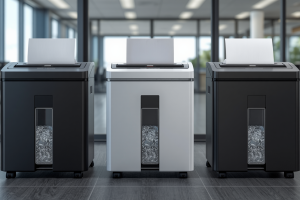
The oldest and simplest design, strip-cut shredders slice paper into long vertical ribbons. They’re fast, have high sheet capacities, and are inexpensive to buy and maintain.
The downside is that the strips can still be reassembled, so in theory, a determined person with time and patience could reconstruct a document. For most non-sensitive applications, they’re fine, but they shouldn’t be trusted with anything confidential.
Cross-Cut Shredders
Cross-cut machines add a horizontal blade to the vertical cut, producing short diamond or rectangular pieces. This dramatically increases the number of fragments and makes reconstruction practically impossible for everyday purposes.
These shredders are often the most popular choice for general office use. They balance out security, speed, and cost effectively.
Micro-Cut Shredders
Micro-cut shredders produce tiny square or near-square particles. A single A4 sheet might be reduced to over 2,000 pieces. They’re quieter than older cross-cut models, produce less volume of waste, and offer a significantly higher level of security.
The drawback is that they tend to be slower and more sensitive to overloading.
For offices handling sensitive client data, financial records, or personal information, they are the recommended choice.
Shredder Bins and Consoles
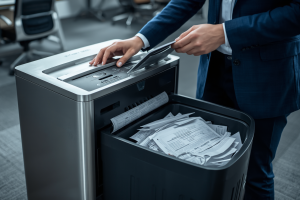
Beyond the tabletop and freestanding personal models, larger offices often benefit from console shredders. These are tall, lockable units that sit on the floor and accept paper from a slot in the top.
They are predominantly designed to be used in open-plan areas so that staff can bin documents throughout the day, with shredding happening automatically or on a scheduled basis.
As they combine a bin with the shredder itself, it reduces the need for separate waste collections.
Matching the Machine to Your Office’s Needs
The type and size of office you have will make a big difference as the appropriate paper shredder. Here’s how to determine what might best suit your needs:
For Home Workers and Small Offices
If you work from home or run a small business with just a few staff, a compact personal shredder will generally suffice. Look for something rated P-4 or above, with a sheet capacity of 8–12 pages and a bin volume of around 20–30 litres.
You won’t be shredding continuously, so duty cycle (the amount of shredding before the motor needs to cool) is less of a concern.
A machine that can also handle CDs, credit cards, and staples is worth having. These items are easily forgotten but can contain just as much sensitive data as a paper document.
For Medium-Sized Offices
A team of 5–20 people generates a meaningful volume of paper waste. Here, you’ll want to look at departmental or workgroup shredders. This includes machines with higher sheet capacities (15–20 pages at once), larger bins (40–80 litres), and longer duty cycles.
Auto-feed models, which allow you to load a stack of documents and walk away, can be a genuine time-saver at this scale.
You also want to think about where the shredder will be positioned. If it’s in a shared area, a console model with a deposit slot may be best. This reduces the risk of people leaving sensitive documents on top of the machine or walking away mid-shred.
For Large Organisations
High-volume offices such as legal firms, accountancy practices, healthcare providers, financial institutions need industrial-grade shredding solutions.
These machines can process hundreds of sheets per minute, run continuously without overheating. They also often come with extra security features such as lockable paper feeds.
At this level, it’s also worth considering whether an outsourced secure shredding service might be of use.
Features Worth Paying Attention To
If you’re going to buy a shredder, be sure to look for standout features, such as:
- Auto reverse/jam protection: Paper jams are the bane of office shredders. Better machines detect resistance and automatically reverse the blades to clear blockages, saving you the frustration of manually extracting crumpled paper.
- Quiet operation: some shredders can be disruptive, especially in open-plan environments. Look for models marketed as quiet or whisper-quiet if noise is a concern.
- Energy-saving modes: a shredder that automatically powers down when not in use can use much less electricity over the course of a year. This is an increasingly important consideration if you’re looking to manage your energy costs better.
- Bin capacity: larger bins mean less frequent emptying, but make sure the mechanism is practical. Pull-out drawers, for example, are generally easier to manage than lift-out bins, especially when they are full.
- Multi-media shredding: if your office produces a variety of waste, a machine that handles all of these without requiring you to remove them first is considerably more convenient.
Where to Buy and What to Expect to Pay
Entry-level personal shredders start at around £30–£50 and will handle light home use reasonably well. For a solid cross-cut or micro-cut office machine with a good duty cycle, budget £80–£200.
High-capacity workgroup shredders with auto-feed and advanced features typically run from £200 to £600, while industrial machines can cost considerably more.
For a broad range of office-grade shredders suited to different needs and budgets, Office Stationery is a good starting point. They stock everything from compact personal units to high-volume departmental machines, with clear specifications to help you compare models side by side.
Common Mistakes to Avoid
Before you buy a shredder, it’s best to know what to avoid. In this case, try not to:
- Buying on price alone: the cheapest shredders are often the ones that jam constantly and overheat quickly. It’s worth spending a little more for reliability.
- Ignoring the duty cycle: if your office shreds in batches you need a machine rated for sustained use. A personal shredder pushed beyond its duty cycle will burn out quickly.
- Overlooking the bin volume: machines with a tiny bin that needs constant emptying can become a frustration. Make sure to match the bin size to your shredding frequency.
- Forgetting non-paper items: USB sticks, old hard drives with company data, credit cards all need secure disposal too. Check whether your shredder handles them or whether you need a separate model.
Final Shredding Thoughts
A paper shredder is not a glamorous purchase, and it’s easy to treat it as a box-ticking exercise. But the right machine earns its place in any office.
Take the time to think through your actual needs before buying, prioritise security level over speed or price. Don’t forget that the documents piling up in your recycling bin right now might contain more sensitive information than you realise.
Author Profile

- Blogger by Passion | Contributor to many Business Blogs in the United Kingdom | Fascinated to Write Blogs in Business & Startup Niches
Latest entries
 London DirectoriesOctober 19, 2026Perfect London City Breaks – 7 Must-Do’s For The Best Trip
 Business AdviceOctober 1, 2026Less Chasing, More Selling: Rethinking the Estate Agency Workflow
 Business AdviceSeptember 15, 2026When & Why UK Entrepreneurs Would Need To Think About Document Legalisation
 FinanceSeptember 3, 2026Why Online Donation Platforms Are the Future of Digital Fundraising